COMING TO THE ATLASSIAN MARKETPLACE · WAITLIST OPEN
Turn Jira data into client-ready status reports
ReportCraft drafts your weekly client report straight from Jira issues — done, in progress, blockers & risks, next steps — in your client's language. You review every word before anything is sent. Your client gets a branded link or PDF, no Jira account needed.
✓ Every statement linked to Jira issues — verified automatically
Early access to the private beta · No credit card
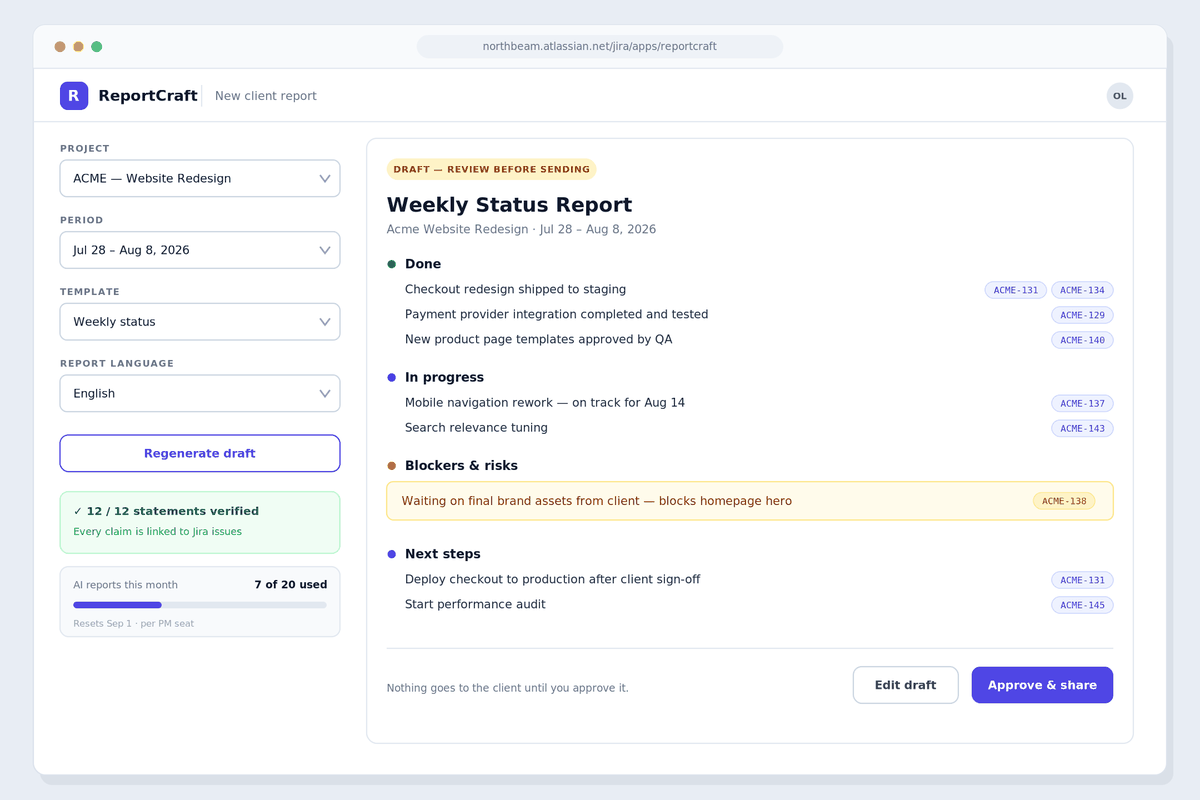
Product preview — final UI may differ
The Friday ritual every agency PM knows
Hours of copy-paste.
Jira already knows what happened this week. But every Friday you rebuild it by hand: scan boards, collect tickets, rewrite everything into an email a client can actually read. Now multiply that by every client project you run.
Raw Jira isn't client-ready.
You can't hand clients your internal boards, comments and estimates — and a filtered issue export looks like a spreadsheet, not a status update. Don't send clients raw Jira. Send them a report.
Built-in reports weren't made for clients.
Jira dashboards and gadgets are internal analytics. Sharing them outside your team is clunky, unbranded, and still leaves the client asking: "So… are we on track?"
From Jira to "sent" in three steps
Pick projects & period.
Choose Jira projects, a date range and a template: weekly status, sprint summary, or monthly executive summary.
Get a grounded draft.
AI drafts the report strictly from your issue data — statuses, transitions, assignees, due dates, sprints. Every statement carries the issue keys it's based on, and a built-in validator rejects anything that doesn't match a real issue.
Edit, approve, send.
Polish the draft or rewrite it — nothing goes out without your approval. Then share a branded web page (no Jira account needed), download a PDF, or copy it as an email. Scheduled drafts land every Friday, ready for review.
Built for PMs who put their name on the report
Facts you can verify — not AI fiction.
AI tools are notorious for making things up. ReportCraft is designed against it: every claim is grounded in your issue data and linked to issue keys like ACME-131. A validator automatically rejects statements that don't match real issues, and you approve every report before it's sent. Prefer zero AI? A structured no-AI mode is always there.
Your brand, your client's language.
Add your logo, colors and signature. Generate the same report in English, German, Polish, Ukrainian, Spanish, French and more — independent of your Jira language.
A link your client will actually open.
Clients get a clean branded web page — no Jira seat, no login, revocable anytime. Or export a PDF, or copy the report as email text.
On autopilot every Friday.
Scheduled drafts are generated automatically and wait for your review. You get a notification, spend five minutes editing, hit send.
Only your PMs pay.
Pricing is per PM seat — not per every user in your Jira. Clients, viewers and the rest of your team are always free.
Data-lean by design.
ReportCraft runs on Atlassian's own Forge platform, reads only the issue fields needed for the report, and stores report snapshots inside your Atlassian site. AI processing is configured for zero data retention — your data isn't used to train models.
The same report — in your client's language
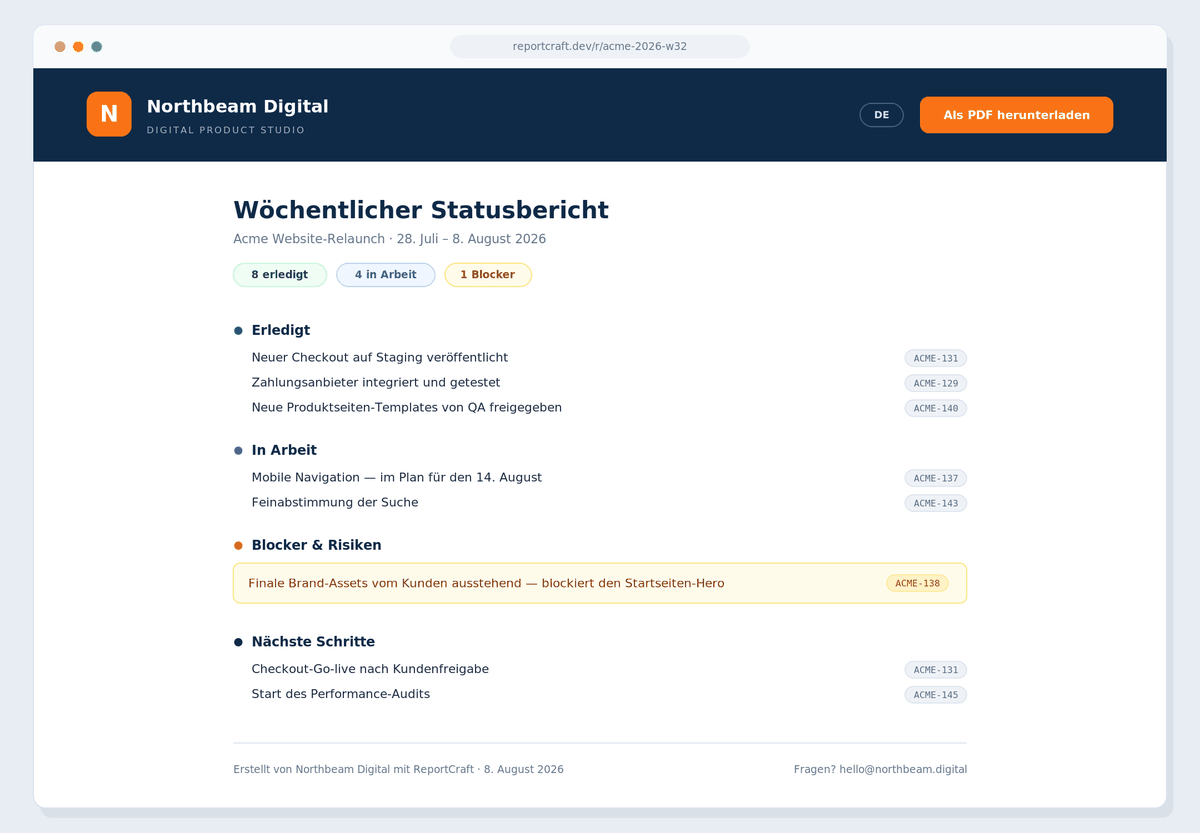
Product preview — final UI may differ
Simple pricing — only your PMs pay
20 AI-generated reports per PM per month included
- Only PMs need seats — clients & viewers are always free
- All templates, languages and branding included
- AI included — no API keys, no separate AI bills
- Unlimited projects and share links
- Billed through the Atlassian Marketplace — free trial included, cancel anytime
A team of 3 PMs = $57/month — flat and predictable, no matter how many people use your Jira.
Fair use: the AI quota resets monthly and unused reports don't roll over. Need more? Add PM seats — or tell us what you need.
Frequently asked questions
How is this different from Jira dashboards or giving clients board access?
Dashboards show raw data and leave the interpretation to your client. A status report is communication: what got done, what's blocked, what happens next — written in plain language, in your client's language, under your brand. ReportCraft turns Jira data into that report and gives your client a single clean link or PDF instead of a login to your internal tooling.
I've seen AI reporting apps on the Marketplace for $6–8/month. Why is ReportCraft $19 per PM?
Those tools are a different category: mostly automated release notes (a changelog of what shipped in a release) or internal analytics. ReportCraft produces a client-facing project status report — done / in progress / blockers & risks / next steps — as a branded share page or PDF in your client's language, with every statement verifiably linked to issues and AI included in the price (no bring-your-own API keys). You're not buying "AI text in Jira"; you're buying the hours a PM spends every Friday and a deliverable you can put your agency's name on.
Why price per PM instead of per Jira user, like most apps?
Because on real agency sites, per-user pricing punishes you for the size of your Jira, not the value you get. Typical per-user reporting apps average around $1 per user: on a 100-user site that's roughly $100+/month even if only two people ever open the app. With ReportCraft, 3 PMs = $57/month — flat, whether your Jira has 30 users or 300. (Fair warning: if your whole site is under ~10 users, per-user apps can be cheaper. ReportCraft is built for teams where charging every Jira user makes no sense.)
What if the AI gets something wrong in a client report?
This is the fear we designed the whole product around. The AI can only use your actual issue data — no outside knowledge, no guessing. Every statement carries the issue keys it's based on, a validator automatically rejects claims that don't match real issues, and nothing is ever sent without your explicit approval. You're always the editor-in-chief. And if you'd rather not use AI at all, the structured no-AI mode builds the same report directly from the data.
Where does our Jira data go?
ReportCraft runs on Atlassian Forge — Atlassian's own app platform — and stores report snapshots inside your Atlassian site. For AI generation, the minimum necessary issue data is processed with a zero-data-retention configuration: it is not stored by the AI provider and not used to train models. A full privacy policy and DPA will be published at launch.
Which languages are supported?
The report language is independent of your Jira language. At launch: English, German, Polish, Ukrainian, Spanish, French, Italian and more. Write reports for your Berlin client in German while your team works in English.
Does my client need a Jira account?
No. Your client gets a branded web page (revocable link, no login) or a PDF — whichever you prefer. They never touch Jira.
When does it launch, and what does the waitlist get?
We're planning a private beta in autumn 2026 and a public Atlassian Marketplace launch in late 2026. Waitlist members get first access to the beta, direct influence on what we build, and founding-user perks we'll announce closer to launch. A few teams can also get hand-prepared reports from us before the product ships — see the note after you sign up.
Does it work with Jira Server or Data Center?
Jira Cloud only at launch. If you're on Server/DC, join the waitlist anyway and tell us — it helps us gauge demand.
Get your Friday evenings back
Join the waitlist — takes about 60 seconds and genuinely shapes what we build first.